

MacBook Neo: Is It Good Enough for College Students?
Apple’s new MacBook Neo is getting significant attention for one simple reason: it’s the most affordable MacBook the company has released so far.
For years, buying a MacBook meant spending at least $1,000 – and often more. That price made Apple laptops a tough choice for many college students and parents. Now, that might finally change.
With a starting price of $599 — or $499 with the Apple Student Discount — the MacBook Neo is the most accessible laptop Apple has ever made. And by the looks of things, it could quickly become one of the most interesting options on the market, especially for college students buying their first MacBook or those who might otherwise consider a Windows laptop or Chromebook due to budget limitations.
But is the MacBook Neo a good laptop for college students? Let’s take a closer look at its features and performance to help you decide.

Design and Portability for College Life
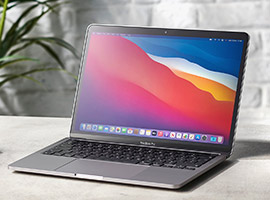
Despite the lower price, the MacBook Neo still feels like a real Mac thanks to its premium design and overall build quality. The laptop keeps the familiar Apple look, featuring a thin aluminum body and a compact 13-inch display.
The display features a sharp Liquid Retina panel that works well for common student activities such as reading, writing assignments, and watching lecture recordings.
For students moving between classes, libraries, and study spaces, portability is an important factor. The Neo weighs 2.7 pounds, making it easy to carry in a backpack throughout the day.
Moreover, it is available in four eye-catching colors: Silver, Blush, Citrus, and Indigo, offering students a few more playful options beyond the typical laptop colors.


Cracked Screens, Spills, Theft + more!

Performance for Basic Student Tasks
The MacBook Neo runs on Apple’s A18 Pro chip, a processor originally designed for the iPhone 16 Pro models but capable of handling everyday computing.
For most college students, the Neo should be good enough for typical tasks, including writing essays and research papers, creating presentations, browsing the web, conducting research, video conferencing for online classes, and streaming educational videos or lectures.
However, students working with more demanding software, such as advanced video editing, engineering, or 3D design tools, may find the Neo less powerful than a MacBook Air or a MacBook Pro.

Battery Life for a Full Day on Campus
Battery life is often one of the most important features for college students. Carrying a charger everywhere isn’t always convenient, especially during long days of classes.
The MacBook Neo is designed to last through most of a full day of typical use (up to 16 hours), including note-taking, web browsing, and streaming videos.
For students who spend hours studying in libraries or classrooms, this kind of battery life can be especially practical, allowing them to work throughout the day without constantly worrying about finding an outlet.
Features College Students Will Love
The MacBook Neo comes with several built-in features students will find useful, including:
- A 1080p webcam for video calls and online classes
- Apple’s Magic Keyboard for comfortable typing
- A large trackpad for easy navigation
- Two USB-C ports and a headphone jack for connectivity
- Solid speakers for music and videos
Because it runs macOS, students also gain access to Apple apps and widely used productivity tools such as Microsoft Office and Google Workspace.
Students who already have an iPhone or iPad may also benefit from Apple ecosystem features like AirDrop, iCloud syncing, and cross-device messaging.
Trade-Offs to Consider
Apple had to make a few compromises to keep the MacBook Neo affordable. While it still performs well for typical student tasks, some features are simplified or missing.
Some limitations include:
- 8GB RAM (not upgradeable)
- No Thunderbolt ports
- No MagSafe charging
- Touch ID only on 512GB storage models
For most students who need a laptop for writing papers, browsing the web, attending online classes, and streaming videos, these trade-offs won’t have much impact.
However, they could matter for students working in fields that demand more performance or specialized features. In those cases, the MacBook Air or MacBook Pro may be the better choice.
So… Should You Get the MacBook Neo for College?
The MacBook Neo may not be the most powerful Mac Apple has made, but that’s not really the point. It’s more than capable for typical college tasks and still delivers the familiar Apple experience. For many students, that makes it exactly what they need: a reliable laptop that gets the job done without breaking the budget.
And with a student price around $499, the MacBook Neo could finally make owning a MacBook possible for many more college students.
Protect your MacBook from college life’s accidents!
If you decide to get the MacBook Neo for college, it’s smart to protect it from cracked screens, drops, and spills. One accident can quickly turn into an expensive repair or replacement you don’t need while at college. With a policy from NSSI, you can protect laptops, phones, tablets, and other valuables from accidental damage, theft, fire, flood, and other potential disasters.
Learn how NSSI Student Personal Property Insurance can keep students’ belongings covered throughout the school year and get a free quote!









 Whether you’re living on campus or studying abroad, NSSI has you covered! From spilling coffee all over your laptop to dropping your smart phone in the parking lot, you’re covered wherever you go.
  Did you know that NSSI covers more than just electronics? We cover everything from clothes to textbooks, even jewelry. So whether you accidentally flushed your great- grandmother’s ring or your roommate ran over that expensive business textbook, we’ve got you covered.
 Do accidents seem to follow you wherever you go? Don’t worry, we can help! At NSSI we offer unlimited claims on damages to your personal property. Whether it’s a shattered laptop or a flattened smartphone, we’ve got you covered.
  Got a dog that lives to destroy furniture? With coverage from NSSI, you can protect your personal property and enjoy your furry friends too. Our plans includes coverage for accidental pet damage.